

如果您已经看过我的"Shadowsocks系列之二 Shadowsocks安装与基本配置",我相信您已经在使用Shadowsocks代理了。但是基本的Shadowsocks的配置无法满足正常的性能和代理访问速度的要求,以下会讲解如何调整内核参数使得shadowsocks运行更加顺畅。
优化分为性能优化和速度优化两部分
第一部分:性能优化
性能优化主要为"内核优化" 以下是内核优化的代码部分
1.1:内核文件修改,清空并修改/etc/sysctl.conf文件内容,内容如下:
fs.file-max = 51200
net.core.rmem_max = 67108864
net.core.wmem_max = 67108864
net.core.netdev_max_backlog = 250000
net.core.somaxconn = 4096
net.ipv4.tcp_syncookies = 1
net.ipv4.tcp_tw_reuse = 1
net.ipv4.tcp_tw_recycle = 0
net.ipv4.tcp_fin_timeout = 30
net.ipv4.tcp_keepalive_time = 1200
net.ipv4.ip_local_port_range = 10000 65000
net.ipv4.tcp_max_syn_backlog = 8192
net.ipv4.tcp_max_tw_buckets = 5000
net.ipv4.tcp_rmem = 4096 87380 67108864
net.ipv4.tcp_wmem = 4096 65536 67108864
net.ipv4.tcp_mtu_probing = 1
net.ipv4.tcp_congestion_control = hybla
1.2:编辑/etc/security/limits.conf文件,在文件末尾加入以下内容:
* soft nofile 51200
* hard nofile 51200
1.3:编辑/etc/pam.d/common-session文件,在文件末尾加入以下内容:
session required pam_limits.so
1.4:编辑/etc/profile文件,在文件末尾加入以下内容:
ulimit -SHn 51200
1.5:配置完成之后,重启下系统,重启完成之后,执行以下命令:
ulimit -n   #运行后得到51200结果为设置成功
sysctl -p   #运行后将内核参数生效
到此内核部分的优化设置完成
第二部分:速度优化
速度优化,本篇我们介绍使用锐速优化软件,以下将讲解锐速的安装
安装锐速前的准备:
* 首先,要去锐速官网注册一个账户,传送门* 然后,在此页面得到锐速的下载地址
* 在服务器上执行以下命令来完成锐速的安装
2.1:安装锐速:
http://my.serverspeeder.com/d/ls/serverSpeederInstaller.tar.gz
tar zxvf serverSpeederInstaller.tar.gz
bash serverSpeederInstaller.sh
2.2:锐速配置(输入您的邮箱和密码):
************************************************************
*                                                          *
*               ServerSpeeder Installer (1.2)              *
*                                                          *
************************************************************

Email address: #注册邮箱
Password: #密码
Enter your accelerated interface(s) [eth0]: #回车默认
Enter your outbound bandwidth [1000000 kbps]: #回车默认
Enter your inbound bandwidth [1000000 kbps]: #回车默认
Configure shortRtt-bypass [0 ms]: #回车默认
Auto load ServerSpeeder on linux start-up? [n]:y #是否开机自启
Run ServerSpeeder now? [y]:y #是否现在启动
2.3:锐速优化设置(编辑/serverspeeder/etc/config文件):
advinacc="1"
maxmode="1"
rsc="1"
gso="1"
accppp="1" #开启VPN加速~
2.4:启动锐速:
/serverspeeder/bin/serverSpeeder.sh start
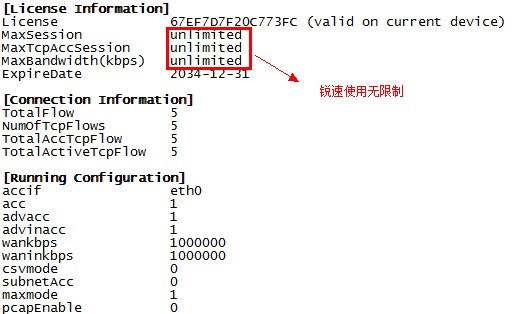
配置结束,到此已经完成关于内核与速度的优化




发表评论: